
We're updating check intervals for free plan monitors on Uptinio. All monitors on the free plan now use a minimum check interval of 5 minutes, in 5-minute increments (5, 10, 15, and so on)—including monitors you created before this change.
Paid plans are unchanged—you can still run checks every 1 minute on Solo, Team, and Agency plans when faster detection matters for production services.
What's changing
When you create or edit a monitor on the free plan, the check interval field now enforces a 5-minute minimum. You'll see this directly in the monitor form, along with a note that 1-minute monitoring is available on paid plans.
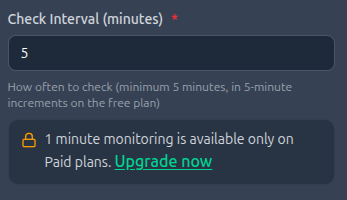
Free plan monitor form showing the 5-minute minimum interval and upgrade prompt for 1-minute monitoring
This keeps the free tier sustainable while we continue offering core monitoring—HTTP checks, SSL monitoring, alerts, and status pages—at no cost.
Why we made this change
Shorter check intervals mean more probes, more data, and more infrastructure cost per monitor. A 1-minute interval generates 5× more checks than a 5-minute interval for the same URL.
For side projects, staging environments, and personal sites, 5-minute checks are still fast enough to catch most outages before users notice. For customer-facing production apps, payment flows, and APIs where every minute counts, 1-minute monitoring remains available on paid plans.
| Free plan | Paid plans | |
|---|---|---|
| Minimum interval | 5 minutes | 1 minute |
| Increments | 5-minute steps | 1-minute steps |
| Best for | Side projects and non-critical sites | Production apps and business-critical endpoints |
What happens to existing free plan monitors
Existing monitors are being updated automatically. If you already have monitors on the free plan with intervals below 5 minutes—such as 1, 2, or 3 minutes—they will be moved to the nearest valid 5-minute interval (for example, 1 minute becomes 5, 3 minutes becomes 5, 7 minutes becomes 10).
You don't need to take any action. Your monitors, alert channels, and URLs stay the same—only the check frequency changes. You can review the updated intervals anytime from your dashboard.
If you rely on 1-minute checks for a production service, upgrading to a paid plan unlocks faster intervals immediately and keeps your current settings where they already meet paid-plan rules.
How to upgrade for 1-minute monitoring
Upgrading takes a few minutes from your billing page:
Once upgraded, create or edit any monitor and set the check interval to 1 minute. No other configuration changes are required.
1-minute checks
Detect outages faster on production endpoints, APIs, and payment flows.
Higher limits
More monitors, integrations, status pages, and team members depending on your plan.
Premium integrations
Unlock SMS alerts and other paid-only features.
Frequently Asked Questions
Can I still use Uptinio for free?
Yes. The free plan is still available with core monitoring features. Only the minimum check interval is changing—not the ability to monitor your sites at no cost.
Will my existing alerts still work?
Yes. Your alert channels, notification rules, and monitor configuration are unchanged. Only the check interval is updated automatically on the free plan.
What interval should I use on the free plan?
Five minutes is a solid default for blogs, portfolios, internal tools, and staging environments. Use 10 or 15 minutes for lower-priority endpoints to reduce noise.
Do heartbeat monitors follow the same rule?
Heartbeat monitors use the same interval field to define how long Uptinio waits before marking a missed ping as down. Free plan heartbeat monitors also require a minimum 5-minute interval.
Final Thoughts
We know interval changes affect how quickly you learn about outages. We chose this update to keep the free tier viable for everyone while reserving 1-minute monitoring for paid plans where it matters most.
If you have questions or feedback, reach out through our support channels—we read every message.